Archive for the 'Programming' Category

12
Feb

redgate Releases SQL Search for Free

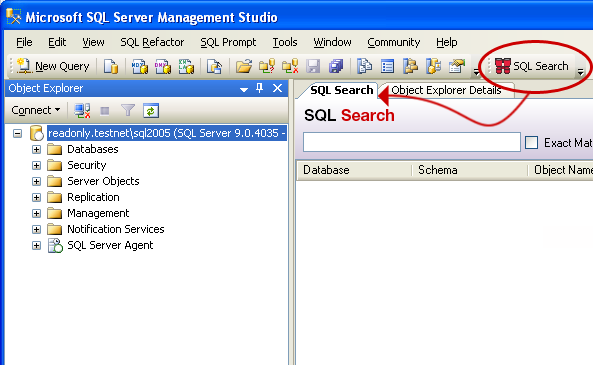
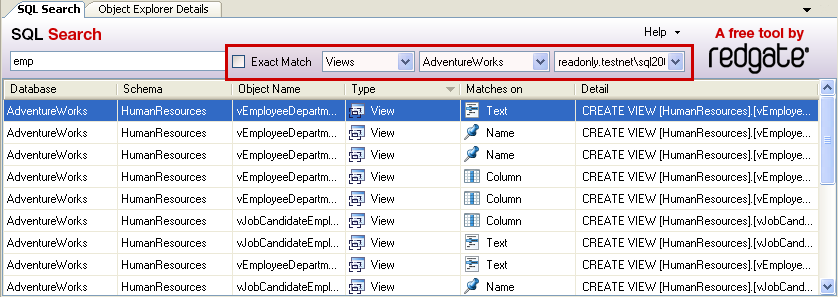
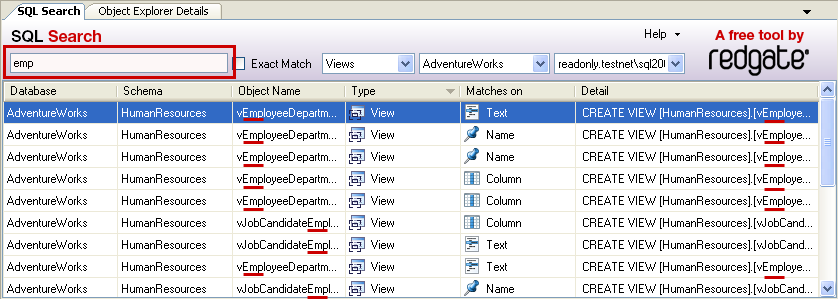
redgate has released their SQL Search 1.0 for free, and my coworker Stephen sent our team an email letting us know about it. It is a fantastic product that integrates with SSMS and now it’s free. It keeps an index of all the text in every sproc, all the columns in every table, etc, and you can search them all instantly, limiting by type and many other options.

These are the features they list on their page:

  • Find fragments of SQL text within stored procedures, functions, views and more
  • Quickly navigate to objects wherever they happen to be on your servers
  • Find all references to an object
  • Integrates with SSMS

And their “Why use SQL Search?”:

  • Impact Analysis
    You want to rename one of your table columns but aren’t sure what stored procedures reference it. Using SQL Search, you can search for the column name and find all the stored procedures where it is used.
  • Work faster
    Finding anything in the SSMS object tree requires a lot of clicking. Using SQL Search, you can press the shortcut combo, start typing the name, and jump right there.
  • Make your life easier
    You need to find stored procedures you’ve not yet finished writing. Using SQL Search, you can search for stored procedures containing the text ‘TODO’.
  • Increase efficiency, reduce errors
    You are a DBA, and developers keep using ‘SELECT *’ in their views and stored procedures. You want to find all these and replace them with a correct list of columns to improve performance and prevent future bugs. Using SQL Search, you can look for ‘SELECT *’ in the text of stored procedures and views.

If you are a user of SQL Server Management Studio, I highly recommend you check out out. You sure can’t beat the price. Check out the screenshots below as well.

11
Feb

A Lesson in How Not to Conduct Website Security

Louisiana Tech just sent me a “reminder” email with my full username and password in there. That information is everything necessary to logon to the school student portal and get the rest of my personal information, full school transcript, etc.

Not only do I not like them emailing my password, I don’t like that they even know my password. They should be using hashes instead. They’re doing it incorrectly.

Here is the full email (user/pass redacted):

Subject: Reminder
TO: <[my.school.email]@LaTech.edu>
Date: Thu, 11 Feb 10 12:35:23 CST
From: <Registrar@LaTech.edu>

REMINDER:

          Your BOSS PIN is: XXXXXX
          Your CWID number is: 100XXXXXX

PROTECT THESE NUMBERS!

I sure wish they’d protect these numbers for me instead of emailing them to me every quarter.

21
Aug

Beyonc□, or How We Can All Learn From Other Developers’ Character Encoding Mistakes

Picture of Unicode Error, displaying Beyoncé as Beyonc-block

I’m sure everyone who reads this blog has noticed, at some point, the result of another developer’s mistake in dealing with Unicode or other character encodings. I’ve had a few issues myself. To the left, you can see how my Napster displayed a Beyoncé song as Beyonc□. You may have seen a black diamond symbol with a question mark in it while browsing a web page, or perhaps other strange symbols when interacting with programs or web pages.

Most, if not all of these, are inconsistencies when dealing with character encoding, with most of them being Unicode. Hazarding a guess, Beyoncé’s is likely stored as Unicode (UTF-16) in Napster’s database, but when output on the screen, it is converted down to UTF-8 or ASCII. Either way, it can’t be converted down, so an entity is displayed. There is even a shirt memorializing the problem in T-shirt form:

I {entity} Unicode T-shirt

My issues have been even more low-level than this. I deal with a lot of interaction using EDI with older computer systems running UNIX or or some IBM mainframe OS. None of these are using Unicode for their medical claims adjudication, and are either using ASCII or EBCDIC. Yes, EBCDIC; I have to program using EBCDIC in 2009.

I have to be very careful when I’m converting to and from Unicode, the native format of the string class in .Net, and other character encodings such as ASCII and EBCDIC, and so should you.


28
Jul

Hacked by Chinese

On our main product, in a branch on which I’m working on a Point of Sale product, something happened in the process of checking files into source control. In our case, we’re using Team Foundation Server. My guess is that the corruption happened on my hard drive for who knows what reason, but this is the beginning of the resulting solution file that ended up in TFS: a bunch of Chinese-looking characters instead of a project name.

Microsoft Visual Studio Solution File, Format Version 10.00
# Visual Studio 2008
Project("{54435603-DBB4-11D2-8724-00A0C9A8B90C}") = "펐!蝀ጢ", "ProductNameFaxServiceSetup\ProductNameFaxServiceSetup.vdproj", "{DDA7A291-A5F6-4FEA-B11E-BBE90848167D}"
EndProject
Project("{FAE04EC0-301F-11D3-BF4B-00C04F79EFBC}") = "CompanyName.Claim.Common", "CompanyName.Claim.Common\CompanyName.Claim.Common.csproj", "{11EE0005-87E4-44E0-806A-0BCB382468F0}"
EndProject
Project("{FAE04EC0-301F-11D3-BF4B-00C04F79EFBC}") = "CompanyName.Claim.Modem", "CompanyName.Claim.Modem\CompanyName.Claim.Modem.csproj", "{FE62F256-5A9C-4212-8EFB-CCD0AC0D59AF}"
EndProject

It took a while to track down, because it manifested itself as missing projects, missing dependencies. I kept adding back things one at a time and then ending up with two more dependencies left to add. Finally, I just looked at the raw solution file and saw how it was messed up. I went back to find a file in the source control history that wasn’t messed up, got that specific version by change set, and then added the specific projects that had been added since then back to the solution.

Thanks to source control, I was back up and running in no time.

The title is from the phrase with which the Code Red worm defaced web sites it infected. We didn’t really get hacked by the Chinese.

24
Jul

Accessing a Control Without Being Able to See It on a Windows Form

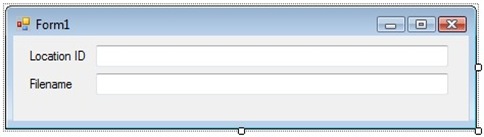
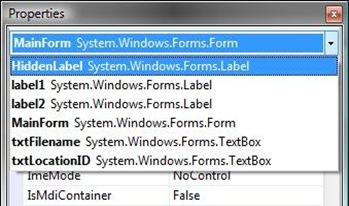
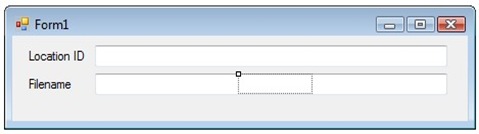
Menu Key Displayed on KeyboardA coworker of mine had a problem and came to me for help. She had a windows form with a control on it that she wanted to edit or delete, but couldn’t see the control. It was listed in the properties box in the list of controls on the form, but when she selected it, she wasn’t able to click it on the form, because it was behind another control.

I hypothesized a solution, which worked, but requires the use of a less than frequent key on your keyboard, the menu key. Usually this key is two keys to the right of the space bar on windows keyboards, between Alt and Control. A picture of it is on the right.

Note: As pointed out by Lee, in the comments, you can press Shift + F10 if your keyboard doesn’t contain the Menu Key.

The Form With a Hidden Label Behind the Filename TextBox) Form with hidden label control

Properties Window Listing the Hidden Control, HiddenLabel

Properties window list of controls

Select the control that you can’t see. It will be highlighted on the form.

Form with Hidden Control Highlighted

Label highlighted after selecting from properties windowThe hidden control becomes highlighted. Click into the title bar of the form. Press the menu key on your keyboard to display the context menu.
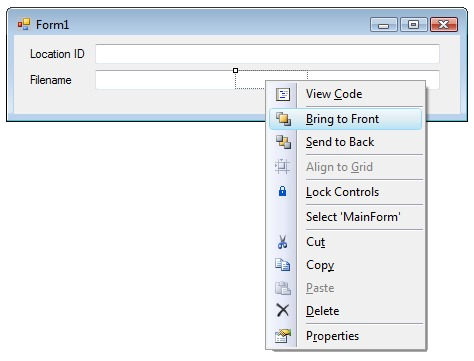
Context Menu Being Displayed After Pressing the Menu Key

bringtofrontSelect “Bring to Front” to display the control. It will now be visible and can be edited or removed.

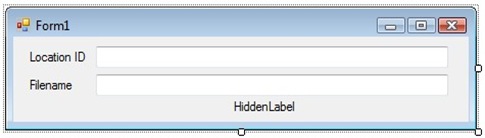
Hidden Control Moved

Label after being brought to front and movedAs you can see, the control that was previously hidden is now visible and has been moved.

I know this is a basic solution to an easy problem, but I had to figure it out, and I hope that someone searching may find this useful as well. The above example was a new form I was starting; it is not the actual application in question.

23
Jul

Using Reflection to Dynamically Generate ToString() Output

Update: Added code to show “null” when a property is null, like Visual Studio does.

If you’ve ever used Visual Studio in any iteration in any language, you have most likely used the immediate window. It’s insanely useful and lets you just type an instance of an object and if the object doesn’t have an overridden ToString() method (I’m back in C#/.Net world here for the purposes of this post), Visual Studio will dynamically generate output for you, so that you can see the current state of the object.

Here is what Visual Studio’s output looks like on an object I have:

{CompanyName.CreditCard.Processor.CreditDebit.SaleResponse}
    base {CompanyName.CreditCard.Processor.Response}: {CompanyName.CreditCard.Processor.CreditDebit.SaleResponse}
    AddressVerificationSuccess: true
    AuthorizationCode: null
    AuthorizedAmount: 50
    CvvSuccess: false
    ReferenceNumber: null

However, what if you want to be able to have ToString() generate this type of output for you, for the purposes of debugging, like using with Debug.WriteLine or Trace or any other logging framework? It is useful to be able to see later what the state of an object was during a problem situation. Sure, you can write your own ToString() code in every object to generate its state in string form, and then aggregate all the base objects using base.ToString(), but that is a lot of iterative, repetitious coding.

My classes are simple data transfer objects and look like this:

public class SaleResponse : Response
{
    public virtual bool AddressVerificationSuccess { get; set; }
    public virtual bool CvvSuccess { get; set; }
    public virtual string AuthorizationCode { get; set; }
    public virtual string ReferenceNumber { get; set; }
    public virtual decimal? AuthorizedAmount { get; set; }
}

public class Response
{
    public virtual bool Success { get; set; }
    public virtual string ResponseMessage { get; set; }
    public virtual string TransactionID { get; set; }
    public virtual string GatewayResponseCodeText { get; set; }
    public virtual string IssuerResponseCodeText { get; set; }
    public virtual GatewayResponseCode GatewayResponseCode { get; set; }
    public virtual IssuerResponseCode IssuerResponseCode { get; set; }
}

As you can see, Visual Studio didn’t even give me the contents of the base class, but I want this information. My ToString() method I’ve created in the SaleResponse object is the following:

public override string ToString()
{
    var flags = System.Reflection.BindingFlags.Instance | System.Reflection.BindingFlags.Public | System.Reflection.BindingFlags.FlattenHierarchy;
    System.Reflection.PropertyInfo[] infos = this.GetType().GetProperties(flags);

    StringBuilder sb = new StringBuilder();

    string typeName = this.GetType().Name;
    sb.AppendLine(typeName);
    sb.AppendLine(string.Empty.PadRight(typeName.Length + 5, '='));

    foreach (var info in infos)
    {
        object value = info.GetValue(this, null);
        sb.AppendFormat("{0}: {1}{2}", info.Name, value != null ? value : "null", Environment.NewLine);
    }

    return sb.ToString();
}

Which generates the following output:

SaleResponse
=================
AddressVerificationSuccess: True
CvvSuccess: False
AuthorizationCode: null
ReferenceNumber: null
AuthorizedAmount: 50
Success: True
ResponseMessage: null
TransactionID: AXB234234
GatewayResponseCodeText: null
IssuerResponseCodeText: null
GatewayResponseCode: ExpiredDevice
IssuerResponseCode: Error

What I like about this approach is that it grabs all the base object’s properties recursively. Obviously, there are performance concerns with doing reflection, so I wouldn’t use this constantly, but I think it’s a good way to write out the state of an object in the event of an error. Also, I made the example simple for this blog post, but obviously, you could put that code into an extension method for System.Object or just into a static utility class, adding an object parameter and replacing “this” with the name of the object parameter.

16
Jul

Strong Name an Assembly Without Source Code

Because I program in the 1970’s, part of what I do is programming against modems and serial ports. Specifically, we send medical claims over modem to adjudicators, in the event of unavailable internet access. As a customer, you’ll appreciate having your pharmacy delay you for 20 seconds rather than saying “Sorry; you can’t have your medicine.”

While taking a break from disco dancing, I was trying to add a strong name to one of our projects. One of the requirements, however, for strong naming is that all of the assemblies you reference must be strong named as well. All are, except one: COMM-DRV/Lib.Net. We use this assembly to talk to the modems, because it abstracts a lot of the serial communications and allows us to program against a logical “modem”.

I called the vendor, Willies Computer Software Company, and he said that we’d have to have the source license to strong name, but I asked why they don’t strong name their own binary distribution. He just kept saying they don’t do that, and we’d have to buy the source license. We didn’t need to make changes to their code, though; in fact, I already did that by inheriting their class and hiding some methods with new ones.

So, I set about trying to find out how to strong name an assembly for which you do not have the source. The short answer is “you can’t.” The longer answer is “You can’t, unless you disassemble it, reassemble it, while signing at the same time, and only if it’s not obfuscated.” I finally found the answer I was looking for at geekzilla.

Here are the steps you need (back up your old assembly):

Create a Key Pair

This is only necessary, of course, if you don’t already have one generated for yourself or your company.

sn.exe -k C:\Path\To\KeyPair.snk

Disassemble the Assembly into IL

ildasm.exe CdrvLibNet.dll /out:CdrvLibNet.il

Reassemble the Assembly from IL While Signing

ilasm.exe CdrvLibNet.il /dll /output=CdrvLibNet-StrongNamed.dll /key=C:\Path\To\KeyPair.snk

The Result

Thankfully, everything worked great, because their assembly was not obfuscated (it’s basically a .Net wrapper around their C++ unmanaged, native DLL product, so no real intellectual property to steal here). Now, we have their product strong named with our public key, and we are able to build on top of it with a strong named product of our own.

15
Jul

How Insensitive

Update: Added section at the bottom detailing what not to do.

As part of the updater process that I wrote for a current project, a “boot strapper” program queries the database for available versions, and if there is a newer version available, it deletes the current program folder, replaces those files with the new files, and then executes the main program executable. If there are no newer versions, it simply executes the main program executable immediately. This gives the user they are executing the program itself, instead of the “invisible” boot strapper, but we are able to easily manage updates in this manner.

Obviously, if you are a .Net developer, you know about the venerable app.config, which is used to set program parameters at run-time, rather than at design time. Because these can contain changes to our connection strings and custom configuration sections, we wanted to preserve this and other special files that may be used in the future. As our solution, we created a whitelist of files that we do want to replace, that looked like this:

        ///
        /// Extensions of files that may be deleted during uninstall/reinstall.
        ///
        private List _deletableExtensions = new List(
            new string[] { ".exe", ".dll", ".pdb", ".chm", ".manifest" });

        private bool canDeleteOrOverwrite(FileInfo file)
        {
            // Only delete files with specific extensions.
            bool canDelete = _deletableExtensions.Contains(file.Extension);

            return canDelete;
        }

Before anybody murders me, we camel case private methods and underscore prefix and camel case private class-level variables here. As you can see, this will allow deletion of executables, class libraries, debug symbols, help files, and manifests. However, we had a problem in my code that didn’t surface until yesterday. We were trying to figure out why one file out of all the files in the directory was remaining an older version, “ActiveReports3.DLL”.

What may be obvious to the reader, especially considering the title of this post, is that my List<T>.Contains() check, by default, is case sensitive, and “.DLL” != “.dll”. This required quite a bit of stepping through code to find, as I wrote this code a long time ago. A simple press of “Ctrl+Shift+Space” revealed that there was an overload of IEnumerable<T>.Contains(T item, IEqualityComparer<T> comparer).

Because I’ve had to do this in the past, I knew that, because my T in this case was string, all I needed to do was use the StringComparer, which implements the IEqualityComparer<string> interface. Because it is filenames, and we are working with Visual Studio generated files, we care neither about culture nor case in this instance. Here is the revised, working version:

        ///
        /// Extensions of files that may be deleted during uninstall/reinstall.
        ///
        private List _deletableExtensions = new List(
            new string[] { ".exe", ".dll", ".pdb", ".chm", ".manifest" });

        private bool canDeleteOrOverwrite(FileInfo file)
        {
            // Only delete files with specific extensions.
            bool canDelete = _deletableExtensions.Contains(
                file.Extension,
                StringComparer.InvariantCultureIgnoreCase);

            return canDelete;
        }

That’s it! That tiny change fixed our issue and allowed the boot strapper to overwrite that file. It’s amazing that a simple little omission like that can lead to such a strange problem manifesting itself. Everybody makes mistakes; I just thought I’d showcase one of my errors and how I fixed it.

After talking to one of my coworkers about this post, he mentioned something that we have both seen done to “work around” this particular problem, which should not be done. This is what I have seen before in others’ code:

        ///
        /// Extensions of files that may be deleted during uninstall/reinstall.
        ///
        private List _deletableExtensions = new List(
            new string[] { ".exe", ".dll", ".pdb", ".chm", ".manifest" });

        private bool canDeleteOrOverwrite(FileInfo file)
        {
            bool canDelete = false;

            // Only delete files with specific extensions.
            foreach (string currentExtension in _deletableExtensions)
            {
                if (currentExtesion.ToLower() == file.Extension.ToLower())
                {
                    canDelete = true;
                    break;
                }
            }

            return canDelete;
        }

This creates a LOT of strings on the heap in the process is and is very inefficient. It’s much better to let .Net handle itself and just let it know whether you care about culture and/or case sensitivity.

07
Jul

A Day Late and a Property Declaration Short

I know this is a bit late to the game, but this morning, as I’m refactoring a bunch of old code to be shared with a new project, I’m cleaning up the C# 2.0 property declarations we all know and love:

    public class SaleResponse : Response
    {
        protected bool _addressVerificationSuccess;
        public virtual bool AddressVerificationSuccess
        {
            [DebuggerStepThrough]
            get { return _addressVerificationSuccess; }
            [DebuggerStepThrough]
            set { _addressVerificationSuccess = value; }
        }

        protected bool _cvvVerificationSuccess;
        public virtual bool CvvSuccess
        {
            [DebuggerStepThrough]
            get { return _cvvVerificationSuccess; }
            [DebuggerStepThrough]
            set { _cvvVerificationSuccess = value; }
        }

        protected string _authorizationCode = string.Empty;
        public virtual string AuthorizationCode
        {
            [DebuggerStepThrough]
            get { return _authorizationCode; }
            [DebuggerStepThrough]
            set { _authorizationCode = value; }
        }

        protected string _referenceNumber = string.Empty;
        public virtual string ReferenceNumber
        {
            [DebuggerStepThrough]
            get { return _referenceNumber; }
            [DebuggerStepThrough]
            set { _referenceNumber = value; }
        }

        protected decimal? _authorizedAmount;
        public virtual decimal? AuthorizedAmount
        {
            [DebuggerStepThrough]
            get { return this._authorizedAmount; }
            [DebuggerStepThrough]
            set { this._authorizedAmount = value; }
        }
    }

This code is, of course because I wrote it, wonderful and has no flaws, and I used the prop snippet to create the private variable and public property getter and setter. However, I have all those DebuggerStepThrough attributes in there, due to the lovely fun of stepping through code that references properties. That avoids stepping in and out of the property declarations.

Thank the flying spaghetti monster that now, in C# 3.0 (and of course 3.5, 4.0 and on), Microsoft has given us auto-implemented properties. This is now the equivalent code, avoiding the stepping in/out of the get/set and not requiring the declaration of a private variable:

    public class SaleResponse : Response
    {
        public virtual bool AddressVerificationSuccess { get; set; }
        public virtual bool CvvSuccess { get; set; }
        public virtual string AuthorizationCode { get; set; }
        public virtual string ReferenceNumber { get; set; }
        public virtual decimal? AuthorizedAmount { get; set; }
    }

When I first learned this trick, I was extremely thankful to be able to do this as an even shorter shortcut to using the prop snippet and it makes the code a lot prettier. What I didn’t immediately realize is how to control scoping. Let’s say, for instance, I want that AuthorizationCode property to only be able to be set from inside the class itself, and I only want the AuthorizedAmount property to be able to get set from inside the class and inherited classes. I can then change those declarations like this:

    public class SaleResponse : Response
    {
        public virtual bool AddressVerificationSuccess { get; set; }
        public virtual bool CvvSuccess { get; set; }
        // This can now only be set from inside the class
        public virtual string AuthorizationCode { get; private set; }
        public virtual string ReferenceNumber { get; set; }
        // This can now only be set from inside the class and those that inherit from it
        public virtual decimal? AuthorizedAmount { get; protected set; }
    }

This allows you to control the scoping of the getter and setter independently. By default, they inherit the visibility of the property declaration, in this case, public for all. I’m always thankful for the tools Microsoft gives me to make my life easier and to give me more time to spend on the actual work, rather than installing plumbing.

01
Jul

Out of Memory Exception While Attempting to Do SQL CLR

Update: We figured out how to make it work with the help of our DBA and Jonathan Kehayias (see comments). We increased SQL Server’s MEM_TO_LEAVE property, by adjusting the –g command line switch for the service, to 448MB. This increase of the shared memory pool gave SQL Server enough breathing room for its worker threads, and now we are able to return 1536 records in 1 minute 21 seconds, including the Bitmap conversion.

Furthermore, we found a workaround using our reporting engine, which we will implement when we have some breathing room ourselves in our rollout timeline. This will “get it working” for now, which is the requirement handed down from above. Soon though, we will have this working in our application tier, where it belongs.

SQL Server’s CLR abilities are really cool. I have done some benchmarking, performing the same computations in both T-SQL and CLR and I have found CLR to outperform T-SQL by factors of greater than 10 to 1. It’s fantastic for this use.

Unfortunately, it has won a battle against me today. I’ll provide a bit of background first. I am currently working on the Point of Sale component of my company’s pharmacy system, and in particular, I am writing all of the code associated with interacting with the signature pad. I’ve abstracted everything nicely, such that we can support multiple pad’s, and I just have to write a .Net class that implements the ISignaturePad interface.

Obviously, other than the navigational aspects of buttons and listboxes and sale line items being displayed on the pad, capturing signatures themselves is paramount. Because each signature pad can spew out the signature data in a different way, and we want to store the “perfect” vector information, I’ve abstracted the signature data into two classes. The Signature and SignaturePoint classes’ definitions look like this:

    [Serializable]
    public partial class Signature
    {
        public virtual SignaturePoint[] Points { get; protected set; }
        public virtual SignaturePoint TopLeft { get; set; }
        public virtual SignaturePoint BottomRight { get; set; }
        public int Width
        {
            get
            {
                return BottomRight.X - TopLeft.X;
            }
        }
        public int Height
        {
            get
            {
                return BottomRight.Y - TopLeft.Y;
            }
        }
        public int XDpi { get; set; }
        public int YDpi { get; set; }

        private Signature()
        {
        }

        public static Signature CreateFromTT8500String(string signaturePoints)
        {
            var sig = new Signature();
            sig.Points = sig.CreateFromTT8500PointsData(signaturePoints);
            return sig;
        }

        public virtual byte[] Serialize()
        {
            using (var ms = new MemoryStream())
            {
                var bf = new BinaryFormatter();
                bf.Serialize(ms, this);
                return ms.ToArray();
            }
        }

        public static Signature Deserialize(byte[] serializedSignatureBytes)
        {
            using (var ms = new MemoryStream(serializedSignatureBytes))
            {
                var bf = new BinaryFormatter();
                return (Signature)bf.Deserialize(ms);
            }
        }

        protected virtual SignaturePoint[] CreateFromTT8500PointsData(string signaturePoints)
        {
            List list = new List();

            // Do a lot of work here to change the strange format that we get
            // as a string into bytes and transform them into an array of my custom class

            return list.ToArray();
        }

        protected void CropPoints(List list)
        {
            foreach (var point in list)
            {
                point.X -= TopLeft.X;
                point.Y -= TopLeft.Y;
            }

            BottomRight.X -= TopLeft.X;
            BottomRight.Y -= TopLeft.Y;
            TopLeft.X = 0;
            TopLeft.Y = 0;
        }
    }

    [Serializable]
    public class SignaturePoint
    {
        public int X { get; set; }
        public int Y { get; set; }
        public bool PenUp { get; set; }

        public SignaturePoint()
        {
        }

        public SignaturePoint(int x, int y)
            : this(x, y, false)
        {
        }

        public SignaturePoint(int x, int y, bool penUp)
            : this()
        {
            X = x;
            Y = y;
            PenUp = penUp;
        }

        public Point ToPoint()
        {
            return new Point(X, Y);
        }

        public override string ToString()
        {
            return ToPoint().ToString();
        }
    }

As you might have noticed, Signature is marked as Serializable, and that’s exactly what we’re doing to store the “perfect” information in the database. We call the Serialize() method on my Signature class, and store the resulting byte array in the database as VARBINARY(MAX). It works fine when we pull that back with ADO.NET and re-hydrate a Signature object with my static Deserialize() method.

To actually draw a signature on a picture box on a Windows form for example, we call my ToBitmap() method, that is in another file (partial class), and it generates a bitmap of the requested width, height, and pen width, suitable for display on a receipt, screen, report, etc.

However, as a limitation of our ridiculous reporting engine (and we are currently trying to work around it’s oddities), for an upcoming beta, we are trying to get SQL server to create the bitmaps for passing back up to our reporting engine. Yes, I do know that is application tier logic and shouldn’t be performed at the database level. We are still trying to work around it using custom controls with the reporting engine.

So, I create a SQL CLR scalar function in my Signature class (SqlBytes CreateBitmap(SqlBytes serializedSignatureBytes, SqlInt32 width, SqlInt32 height)), moved Signature and SignaturePoint to a CompanyName.SignaturePad.Common assembly, added a reference to System.Drawing. I added the assembly to SQL Serverand fought it a bit (setting TRUSTWORTHY to ON for the database). I had to manually add System.Drawing as well, because the version on my computer didn’t match exactly on the server, yet another pain and indication I shouldn’t be doing this. And another indication was SQL server warning me that System.Drawing hadn’t been tested and that the universe will indeed explode if they change something in it. I accept the risks, at the moment.

Everything worked great… for 3 signatures. As soon as the 4th signature is added, I get this:

Msg 6532, Level 16, State 49, Line 1
.NET Framework execution was aborted by escalation policy because of out of memory.
System.Threading.ThreadAbortException: Thread was being aborted.
System.Threading.ThreadAbortException:
   at System.Drawing.Graphics.CheckErrorStatus(Int32 status)
   at System.Drawing.Graphics.DrawImage(Image image, Int32 x, Int32 y, Int32 width, Int32 height)
   at CompanyName.SignaturePad.Common.Signature.ToBitmap(Int32 width, Int32 height, Int32 penWidth, Color foregroundColor, Color backgroundColor)
   at CompanyName.SignaturePad.Common.Signature.ToBitmap(Int32 width, Int32 height)
   at CompanyName.SignaturePad.Common.Signature.CreateBitmap(SqlBytes serializedSignatureBytes, SqlInt32 width, SqlInt32 height)

Looking at that code, I’m doing everything that I know to do. I’m making sure to Dispose() all Bitmaps, Graphics, Streams, etc. I even tried explicitly setting this to null. SQL Server just runs out of memory after about 3 signatures. I’m not sure if this is a side effect of its execution plan (perhaps forking to multiple workers?).

So… now I’m stuck, and I’m not really sure what to do, until we get a workaround in the reporting engine, which someone else is currently working on. I’ll update this post if we get a working solution.


Twitter