Feb 26, 2014 Update:
Background on the Problem
I live in the Dallas market for Verizon FiOS which is where it seems the problems are happening. The issue manifests primarily for me as an inability to play content reliably on YouTube, but I had many other issues on other CDNs. Trying to view other sites, such as MitchRibar.com, would never succeed for some other FiOS subscribers and me.
The error displayed in Chrome was ERR_CONNECTION_RESET.
List of sites affected
The following sites were reported affected by friends, others on the Internet, and me:
- YouTube
- stackoverflow.com
- icloud.com
- appleid.apple.com
- packagist.org
- 500px.com
- blog.iso50.com
- mitchribar.com
- youtrack.jetbrains.com
- upi.com
- soundcloud.com
- azlyrics.com
- EA Games
- Battlefield 4 (Online Gaming including Xbox Live)
- Seemingly random problems on other sites usually when loading CDN resources
Diagnosis
I called Verizon multiple times and they were no help of course. Since a ping worked and since a traceroute exited their network they said that the problem was either on my side or YouTube’s side and didn’t care that it affected multiple sites. I tried to explain the difference between ICMP and a TCP session but they aren’t that smart, of course. They wouldn’t even talk to me until I plugged in their router which is a terrible piece of equipment I haven’t used for years. I obliged and that’s when I got the above from them. They would not let me talk to a higher tier of support.
However, after finding out some friends had the same issue, I was tipped off to this forum post by started by another Verizon customer. You’ll see most if not all in the thread are from the Dallas market.
I did some ping tests to validate that the problem is the MTU setting. Somewhere in Verizon’s network, close to the DFW side of the route, someone has messed up the MTU and reduced it from the default of 1500 to 1496. Keep in mind that there is a 28 byte header so the successful (non-fragmented) ping size + 28 = MTU.
In the below paste, -f prevents fragmentation of the packet and -l 1472/1468 sets the ping packet length. Keep in mind that the IP header adds 28 bytes and also ping parameters are different on different platforms. This example is from Windows, but check the parameters for your platform to set these options.
>ping mitchribar.com -f -l 1472

Pinging mitchribar.com [205.134.224.227] with 1472 bytes of data:
Request timed out.

Ping statistics for 205.134.224.227:
    Packets: Sent = 1, Received = 0, Lost = 1 (100% loss),
Control-C
^C

>ping mitchribar.com -f -l 1468

Pinging mitchribar.com [205.134.224.227] with 1468 bytes of data:
Reply from 205.134.224.227: bytes=1468 time=42ms TTL=55
As you can see, 1472 (which equates to a 1500 MTU [1472+28=1500]) did not work. Lowering it until I got to 1468 worked, which equates to an MTU of 1496, so you can see, because of Verizon’s now-broken network, we must lower the MTU from the default of 1500 to 1496 to ensure the packets traverse the network correctly.
I don’t use Verizon’s router (I use DD-WRT and changing the MTU is easy: Setup -> MTU) but Jake Smith provided these screenshots to me that I edited to show the steps. They come from a regular Verizon FiOS router.
Steps to Change the MTU
Connect to your router using a web browser
There are many resources available to find out what your router’s LAN IP address is. Connect to this address in your router. Your FiOS router has the default password printed on it if you have not changed it.
My router’s IP is 192.168.0.1, but yours may (and probably will) be different. With my example, I would navigate to http://192.168.0.1 in my web browser.
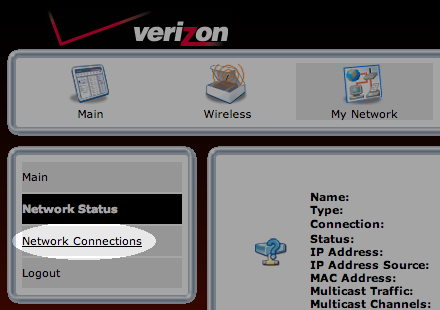
Click My Network

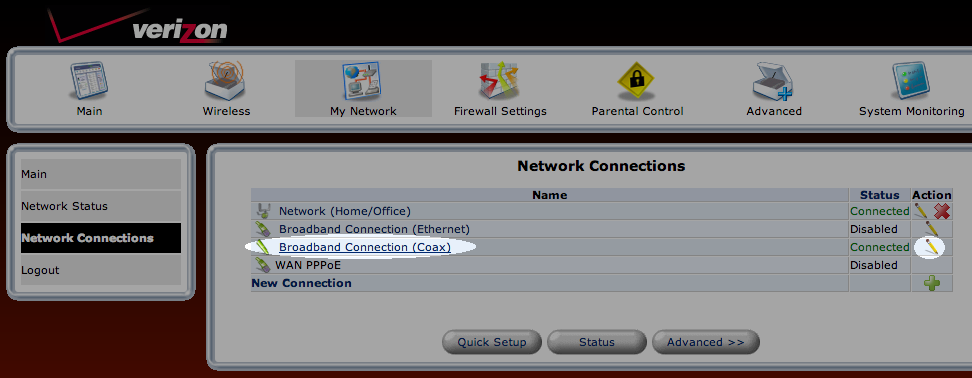
Click Network Connections
Click Broadband Connection or the Pencil Icon to Edit
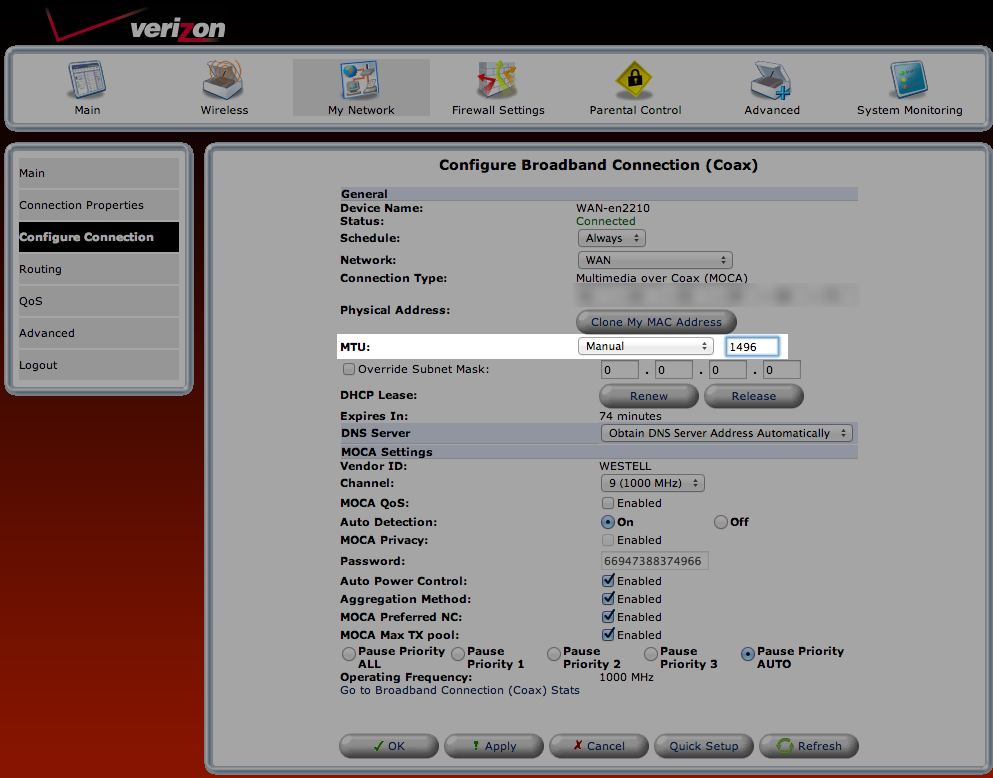
Click Configure Connection

Change MTU to Manual and 1496
Comments